Before you start: decide what kind of audiobook this is
A textbook audiobook is not the same project as a novel audiobook. Three honest questions to answer first:
- Is this a companion or a replacement? A companion audiobook assumes the listener also has the print/ebook open for diagrams. A replacement has to stand on its own.
- How visual is the content? A history textbook with a few maps converts cleanly. A statistics textbook with 200 equations does not — you'll spend more time rewriting than narrating.
- Who is the listener? A self-paced learner re-listening on a commute tolerates more density than a first-time student.
Step 1: Prep the manuscript before upload
The single biggest determinant of audiobook quality is what you upload. Open your EPUB or DOCX in a text editor and do the following passes:
- Replace every figure with a verbal description. "As shown in Figure 3.2" becomes "Picture a normal distribution curve, with the mean at the center and two standard deviations marked on each side."
- Convert tables to spoken summaries. A 12-row table of population data is unlistenable. Either pick the three rows that matter and read them, or summarize the trend in one sentence.
- Spell out equations the way you'd say them aloud.
E = mc²becomes "E equals m c squared."∫ f(x) dxbecomes "the integral of f of x with respect to x."
- Move or inline footnotes. Listeners can't flip to the back. Either fold the footnote into the sentence or cut it.
- Add chapter-end recap cues. "To recap this chapter…" gives listeners a built-in review they can't get from skimming.
Step 2: Create the project and upload
From your dashboard, start a new project and upload the audio-adapted DOCX or EPUB. AuthorVoices auto-detects chapters from your heading structure — make sure your H1s and H2s are clean before uploading or you'll spend an hour fixing chapter splits later.
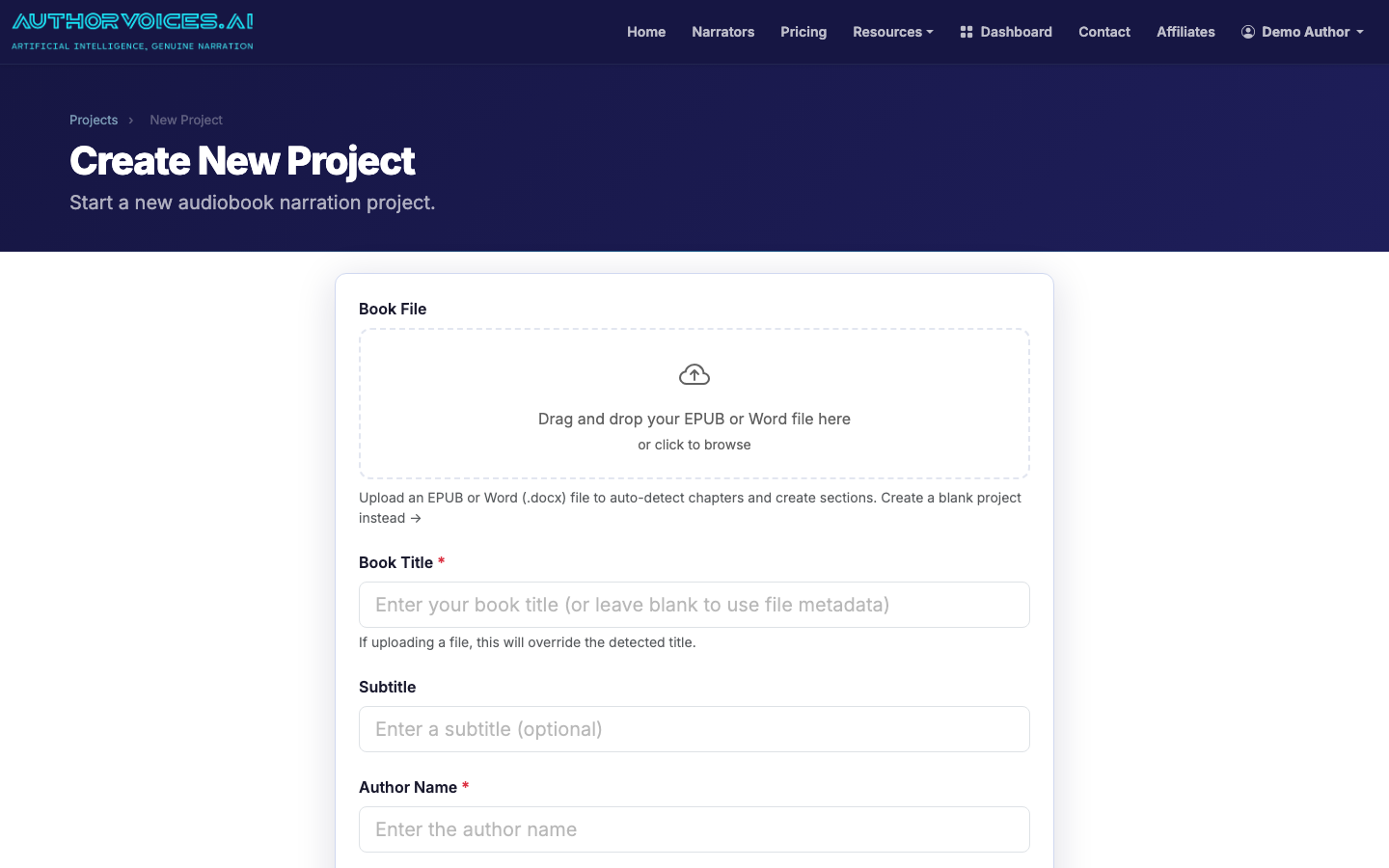
If your textbook has front matter (preface, acknowledgments, how to use this book), keep those as separate sections. They often need a different pacing or even a different narrator.
Step 3: Pick a narrator that fits the subject
Textbook narration rewards clarity over performance. You want a voice that stays intelligible at 1.25× playback speed, since that's how most non-fiction listeners consume audio.
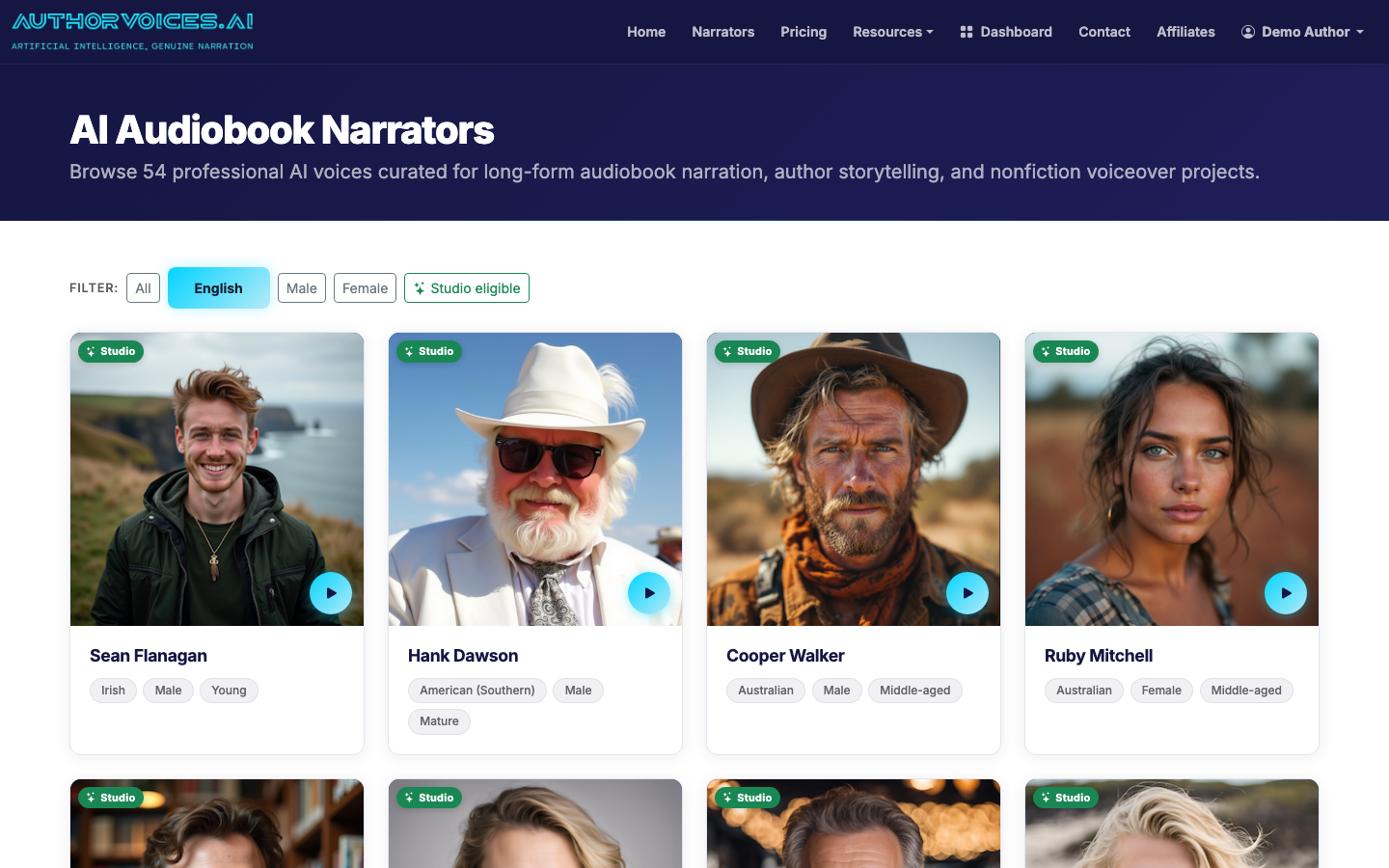
Filtering tips:
- For STEM and technical material: pick a Studio-eligible voice with steady cadence. Avoid the warmer "storyteller" voices — they impose drama on lines that should be flat.
- For humanities and social sciences: more expressive voices work, but test on a paragraph with proper nouns first.
- For language textbooks: don't try to fake the target language with an English narrator. Either pick a native-language voice from the catalog or split the book by language and use two narrators.
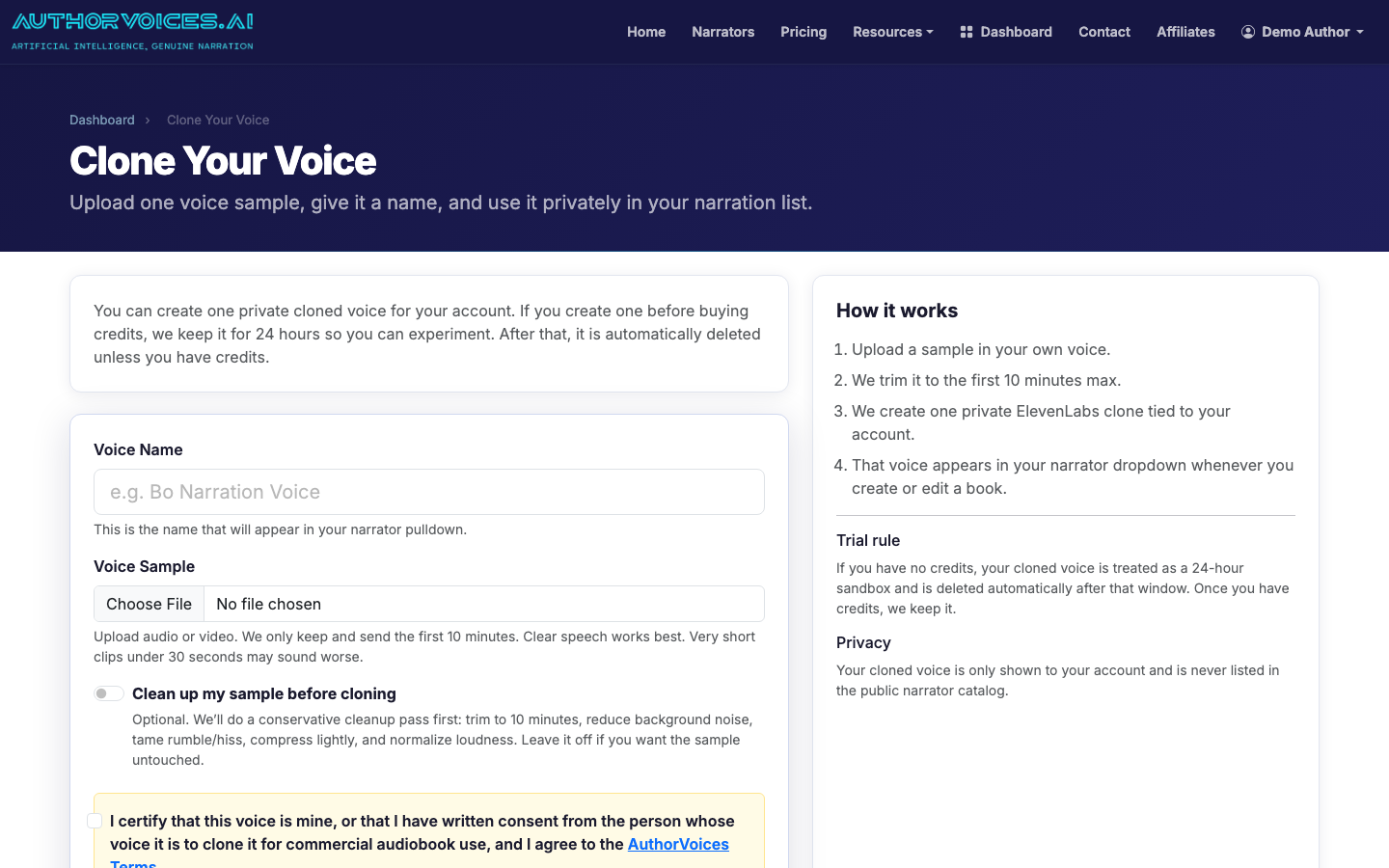
If your textbook is in your own field and you have any on-camera presence, consider cloning your voice from a 30-second sample. Subject-matter authority lands harder when listeners hear it from the author.
Step 4: Narrate a single chapter as a quality test
Do not batch-narrate the whole book first. Pick the most representative chapter — usually chapter 2 or 3, after the introduction settles in — and narrate just that one with Instant Credits.
Listen end-to-end at both 1.0× and 1.25×. What you're checking:
- Pronunciation of jargon. Technical terms, foreign loanwords, author surnames in citations.
- Pacing on lists. A bulleted list of seven items often runs together. You may need to add "first… second… third…" or break it into separate sentences.
- Equations and numbers. "1,250" might be read as "one thousand two hundred fifty" or "twelve fifty" depending on context. Catch the wrong reading now.
Step 5: Fix problems with Quick Fix, then batch the rest
When you find a mispronunciation or awkward phrasing, use Quick Fix on the specific passage rather than re-narrating the whole chapter. Common textbook fixes:
- Phonetic respelling: "Nietzsche" → "Neat-cha"
- Adding a comma to slow down a dense definition
- Replacing a parenthetical with an em-dash so the narrator pauses harder
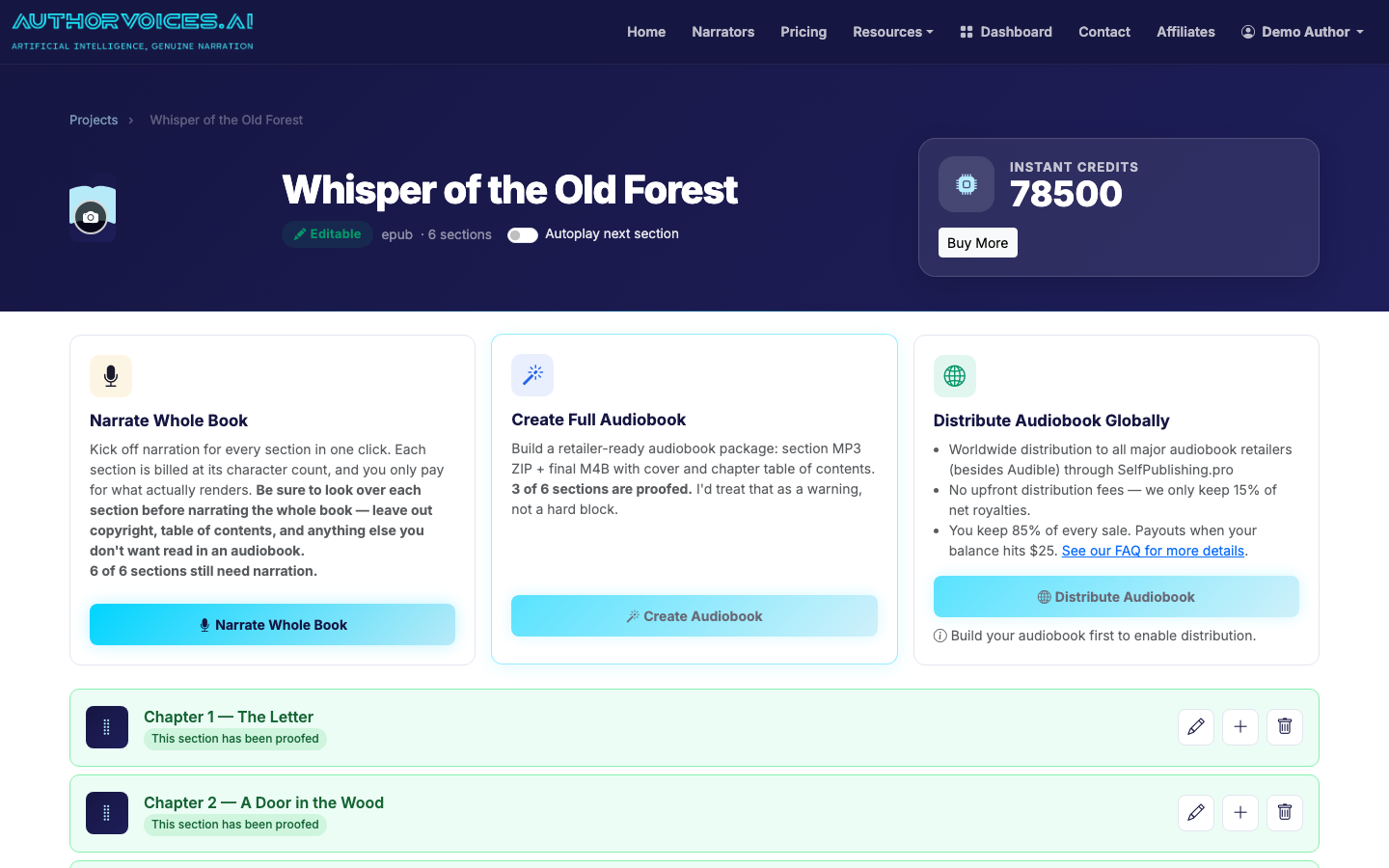
Once your test chapter sounds right, queue the remaining chapters as a Whole Book batch on a Studio plan. For a 300-page textbook, expect the queue to finish in a few hours — long enough to ignore, short enough that you can review the next morning.
Step 6: Master and export
For a textbook, an M4B with chapter markers is almost always the right export format. Listeners need to jump to "Chapter 7, Section 3" — and chapter markers are the only way that works in a podcast app or audiobook player.
Embed the cover art during export so the file shows up correctly in Apple Books, Google Play Books, and the Books app on Android.
Step 7: Distribute everywhere except Audible
This is where textbook authors get tripped up. Audible/ACX prohibits AI-narrated audiobooks unless they're produced through Audible's own tools, so AuthorVoices intentionally doesn't push there. The good news: educational content sells better on non-Audible retailers anyway. Apple Books, Google Play Books, Kobo, Storytel, and library distributors like Findaway are where students actually buy textbooks.
Route distribution through SelfPublishing.pro to hit 50+ retailers in one upload. If your textbook is course-adopted, also consider selling the M4B directly from your course site or as a Gumroad bundle with the PDF — direct sales keep more margin and let you bundle.
For a broader walkthrough of the production side, see our complete guide to making an audiobook and the step-by-step book conversion guide. And if you're wondering why we keep saying "not Audible," the audiobook publishing guide covers it.
What this looks like in practice
A 280-page introduction-to-psychology textbook, audio-adapted to ~240 pages of spoken content, will run about 9–10 hours of finished audio. On a Studio Pro plan, the narration itself takes one batch overnight; the prep pass before upload takes 8–12 hours of focused author time; QA listening takes another 6–8 hours. Budget two weekends, not two evenings.
