If you already have an EPUB or DOCX, you're most of the way to an audiobook. The hard part — structuring chapters, writing clean prose, getting the manuscript into a portable format — is done. What remains is choosing a voice, generating audio, fixing the handful of passages the AI gets wrong, and exporting files retailers will accept.
This walkthrough covers the full path inside AuthorVoices.ai: from upload to a finished MP3 ZIP or M4B you can hand to a distributor. Plan on 60–90 minutes of active work for a 60,000-word book, plus generation time that runs in the background.
1
Before you upload
A clean source file saves hours of cleanup later. Two things matter most:
Use EPUB if you have it. EPUB carries chapter structure natively, so auto-chapter parsing works on the first try. DOCX works too, but you'll want clear Heading 1 styles on every chapter title — not just bold-and-bigger text.
Strip front matter you don't want narrated. Copyright pages, dedications longer than a sentence, and the table of contents almost always sound worse than they read. Delete them from the source file before upload, or skip those sections in the project view after parsing.
If your book has heavy formatting — footnotes, sidebars, image captions, recipe steps — decide now how you want those handled. Footnotes generally read as inline parentheticals or get cut entirely; sidebars work best inserted at natural pause points in the surrounding chapter.
2
Step 1: Create a new project
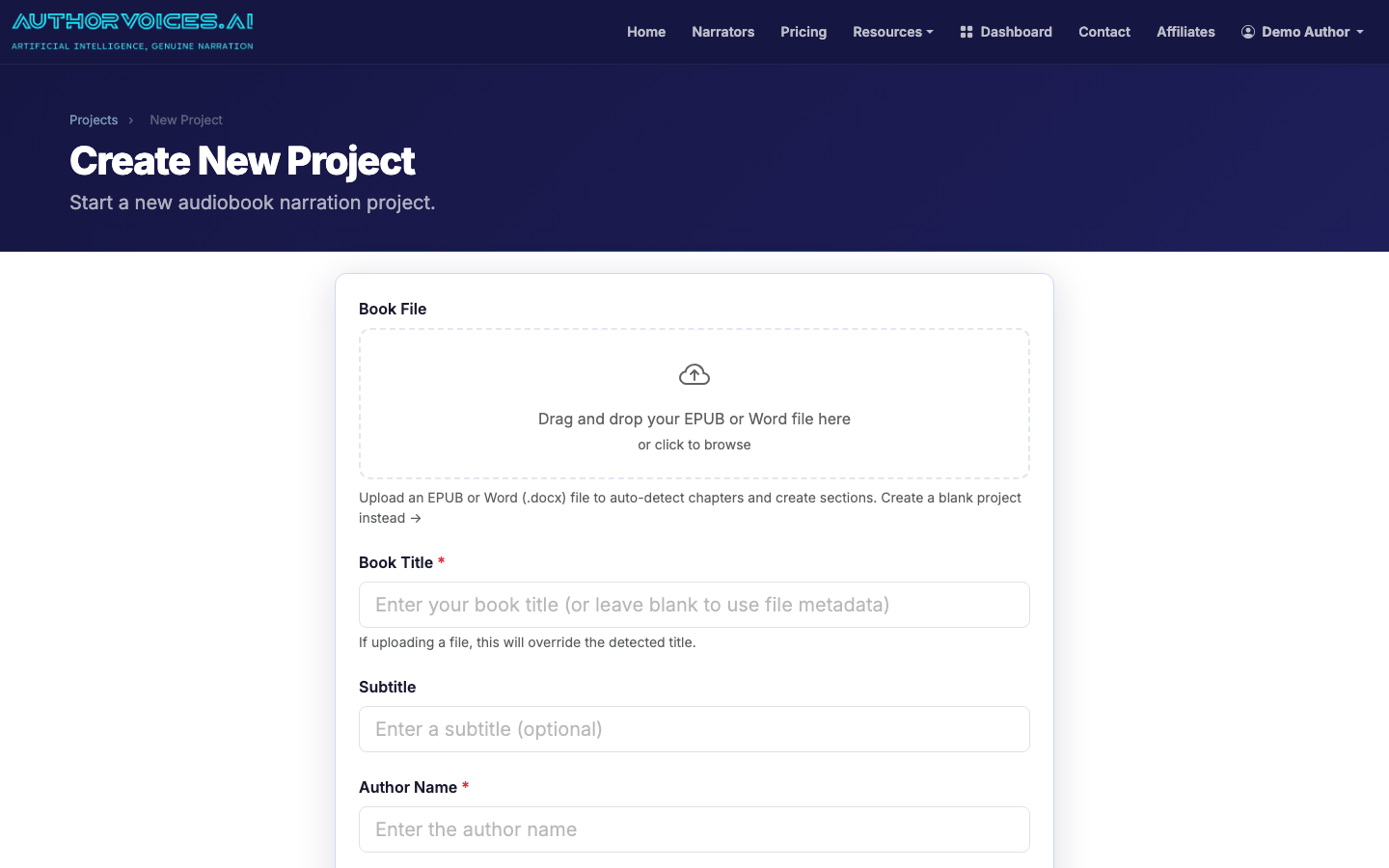
From the dashboard, open Projects and click New Project. Drag your EPUB or DOCX into the upload area, or paste text directly if you're working from a manuscript that hasn't been compiled yet.
Drop your EPUB or DOCX into the New Project page to start parsing chapters.
The parser splits the file into sections — usually one per chapter — and shows you the resulting outline. Scan it. If a chapter is missing or two chapters got merged, the fix is almost always in the source file's heading styles, not in our app. Re-export and re-upload; it takes 30 seconds.
3
Step 2: Pick a narrator
Open the Narrators page in a second tab and audition voices against a paragraph from your own book — not the demo script. A voice that sounds great reading marketing copy can fall apart on dialogue or technical jargon.
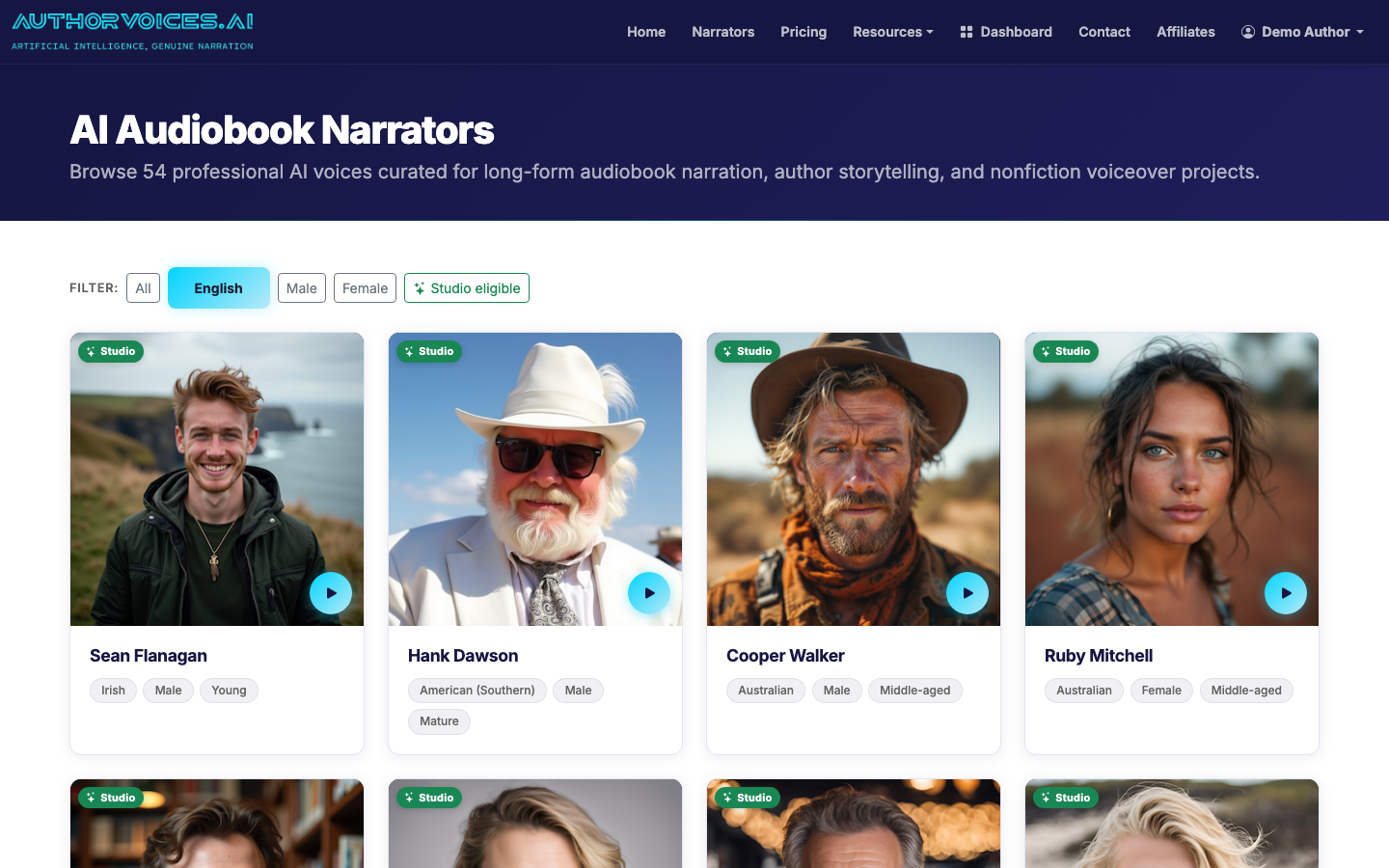
Audition the 54 curated narrators — filter by language, gender, and Studio eligibility.
Filter by language and gender first, then by Studio eligibility if you plan to batch the whole book. The 36 Studio-eligible voices are the ones we've validated for long-form consistency.
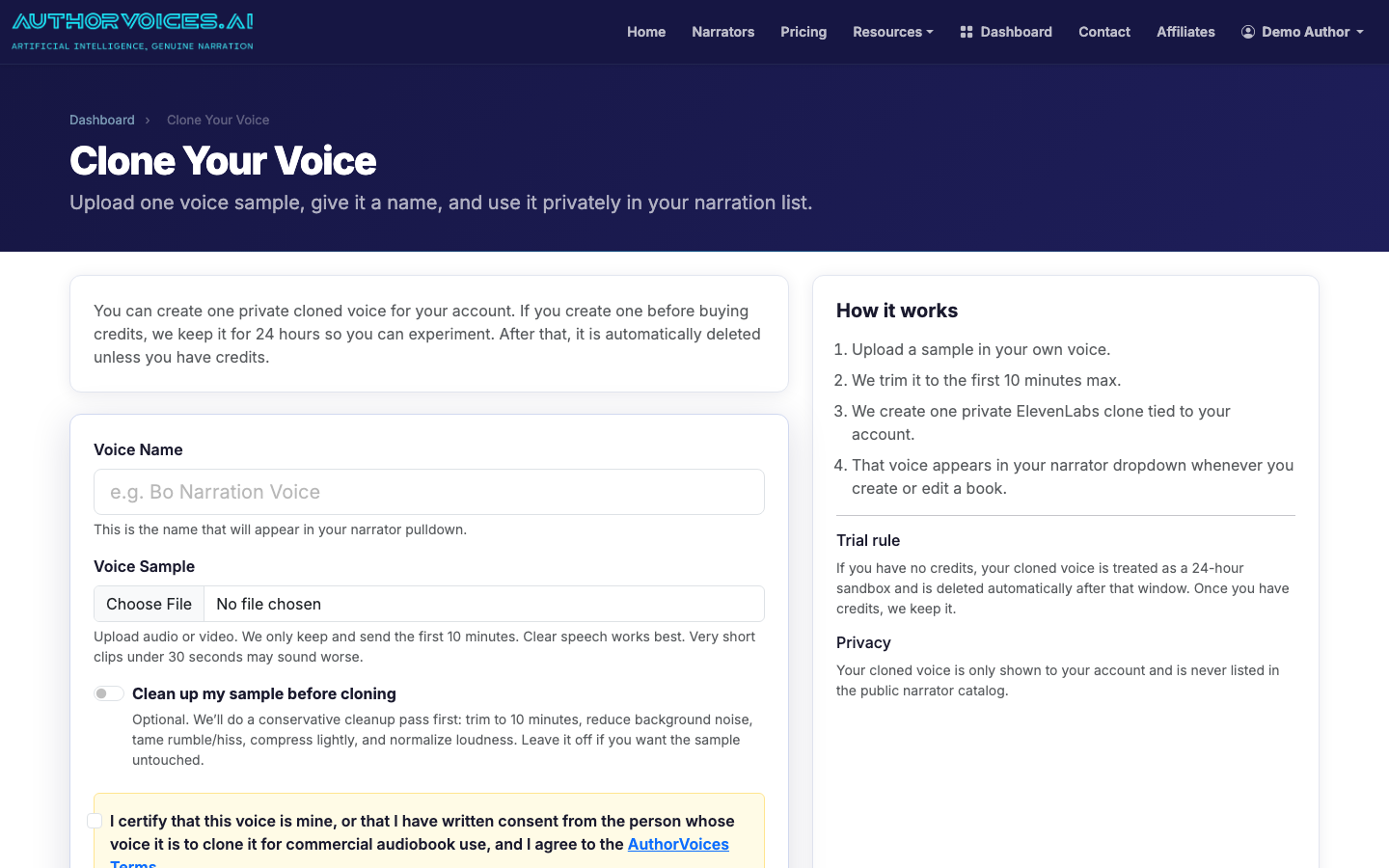
If none of the 54 curated voices fit, clone your own from a 30-second sample. Clear room, no echo, one continuous take.
Upload a 30-second sample to clone your own voice into a private narrator.
4
Step 3: Narrate chapter by chapter — or batch the whole book
Back in your project, you have two paths:
Section-by-section narration using Instant Credits. Best for your first chapter or two — you'll catch pronunciation issues early before burning credits on the whole book.
Whole Book batch queue (Studio plans only). Queues every section and processes them in the background. A 70,000-word novel typically finishes in 2–4 hours of wall-clock time.
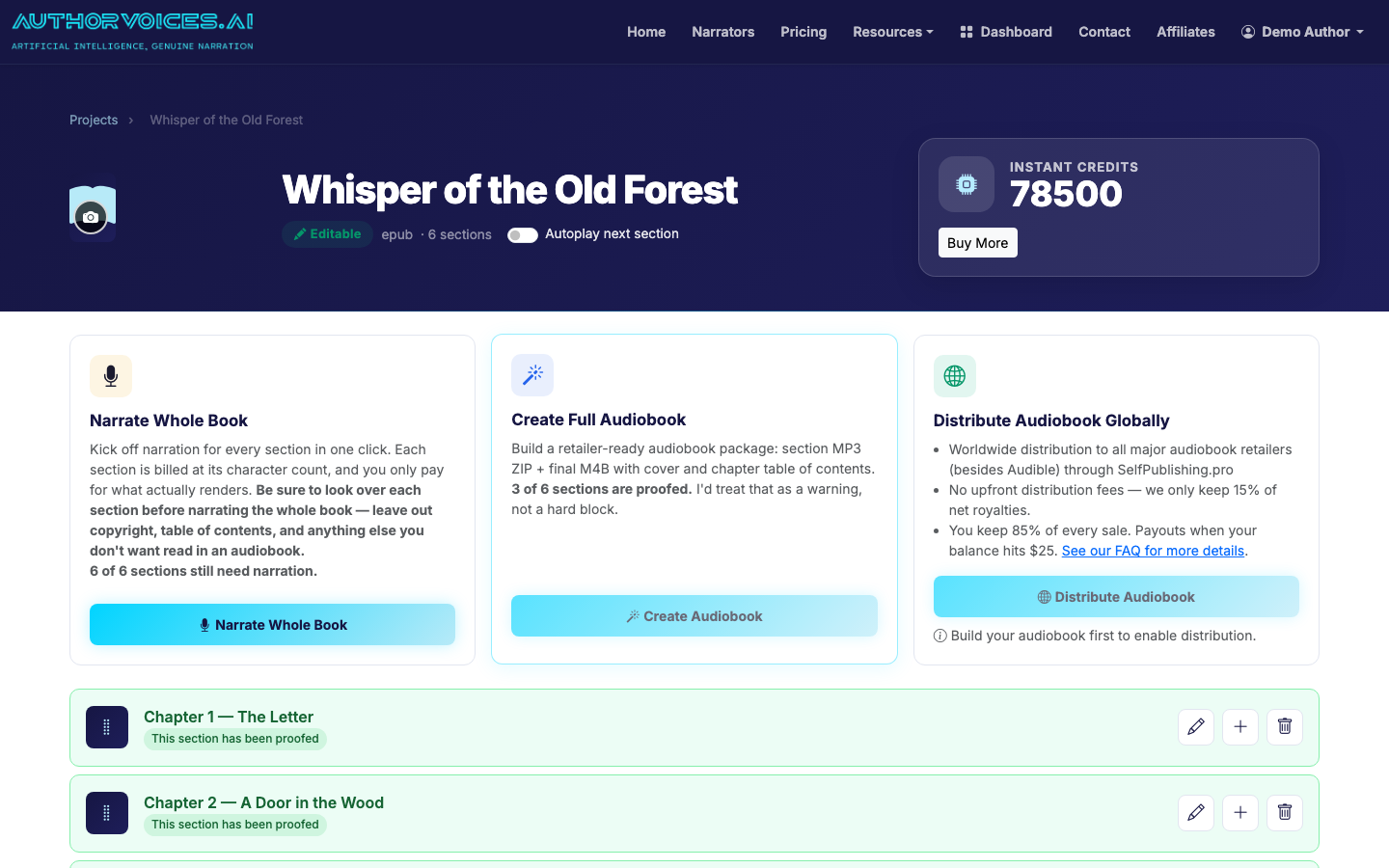
The project view: per-chapter narrate buttons, Quick Fix editing, and Proofed flags.
Start with section-by-section on Chapter 1. Listen to the full output. Note any names, places, or invented words the AI mispronounces — you'll fix those in the next step. Then either continue manually or kick off the batch.
5
Step 4: Fix the rough spots with Quick Fix
AI narration is roughly 95–98% clean on the first pass. The remaining 2–5% is usually:
Proper nouns the model has never seen (character names, fictional places)
Homographs read with the wrong stress ("refuse" the verb vs. the noun)
Numbers and dates read in an unnatural format
The occasional sentence where prosody just sounds off
Select the offending passage in the chapter view and use Quick Fix to regenerate just that span — not the whole chapter. You can also hint pronunciation by respelling phonetically in the source text (e.g., "Siobhan" → "Shi-vawn") before regenerating.
Mark each section as Proofed once you've listened end-to-end. The flag is the only thing standing between you and shipping a chapter you never actually QA'd.
6
Step 5: Export ACX-mastered files
When every section is proofed, export. Two formats:
MP3 ZIP — one file per chapter, mastered to ACX loudness specs (-18 to -23 LUFS, peaks below -3 dB, noise floor under -60 dB). This is what most retailers want.
M4B single file — one file with embedded chapter markers and your cover art. Better for direct sales, Findaway Voices, and library distribution.
If you have cover art ready (1:1 ratio, at least 2400×2400 px), embed it during M4B export.
7
Step 6: Distribute
Once you have the export, you can either upload directly to retailers you already have accounts with, or send the master through SelfPublishing.pro for fan-out distribution to Apple Books, Google Play Books, Kobo, Spotify, Storytel, libraries, and the rest of the network.
How long does it take to convert an ebook to an audiobook?
For a 60,000–80,000-word book, plan on 60–90 minutes of active work — uploading the EPUB, picking a narrator, spot-fixing pronunciations, and exporting. Generation itself runs server-side and takes 2–4 hours of wall-clock time on the Whole Book batch queue, but you don't need to sit there. The slowest part is QA: listening to every chapter end-to-end before marking it Proofed. Skip that step and you'll ship typos you can hear.
How do I turn an ebook into an audiobook without hiring a narrator?
Upload your EPUB or DOCX to AuthorVoices.ai, pick from 54 curated AI narrators, generate the audio chapter by chapter or in one batch, fix any mispronunciations with Quick Fix, and export ACX-mastered MP3s or an M4B. The whole flow runs without a human narrator, studio time, or post-production engineer. Costs run from a few dollars per chapter on Instant Credits up to $49–$149/month for Studio plans that include the Whole Book batch queue.
Can I convert an ebook to an audiobook for Audible?
Not with AI narration. Audible and ACX prohibit AI-generated audiobooks unless they're produced through Audible's own tools, and submitting AI work risks account suspension. AuthorVoices.ai intentionally excludes Audible from its distribution network for this reason. You can, however, sell the same audiobook on Apple Books, Google Play Books, Kobo, Spotify, Storytel, libraries, and 45+ other retailers through SelfPublishing.pro — many of which now reach larger audiobook audiences than ACX in specific genres.
What's the best file format to convert ebook to audiobook?
EPUB. It carries chapter structure natively, so the auto-parser splits sections cleanly on the first upload. DOCX works as a fallback if you make sure every chapter title uses a real `Heading 1` style — not just bold-and-larger text. PDFs aren't supported because the layout-based format makes reliable chapter detection nearly impossible. If you only have a PDF, convert to DOCX with Calibre or Word first, then clean up the headings before uploading.
How do I turn an ebook into an audiobook in my own voice?
Record a 30-second clean voice sample — quiet room, no echo, one continuous take of natural-sounding speech — and upload it on the Voice Clone page. The system generates a private narrator you can use across all your projects. Cloned voices behave just like the curated 54: assign them per chapter, generate, Quick Fix any rough spots, and export. Quality depends almost entirely on sample quality, so re-record rather than ship a sample with HVAC hum or sibilance.
How much does it cost to convert an ebook into an audiobook?
Two pricing models. Instant Credit packs are one-time purchases that never expire — useful if you publish one or two books a year. Studio subscriptions run $49, $99, or $149 per month (17% off annual) and unlock the Whole Book batch queue plus the 36 Studio-eligible narrators tuned for long-form consistency. A typical 70,000-word book runs $30–$80 in Instant Credits, or fits comfortably inside a single month of Studio. Compare that to $1,500–$5,000 for human narration.
How to make an audiobook from your manuscript — upload, narrate, edit, master, and distribute. A practical workflow for indie authors. Start your first chapter today.